
Here is a reminder on the march to follow during a week with a public holiday.
* Be sure to share this information with your Setpad colleagues who enter the hours.
First, check that you have correctly identified the holiday in the Production Schedule.
* Please note that for the upcoming Easter weekend, you must choose either the Friday or Monday.
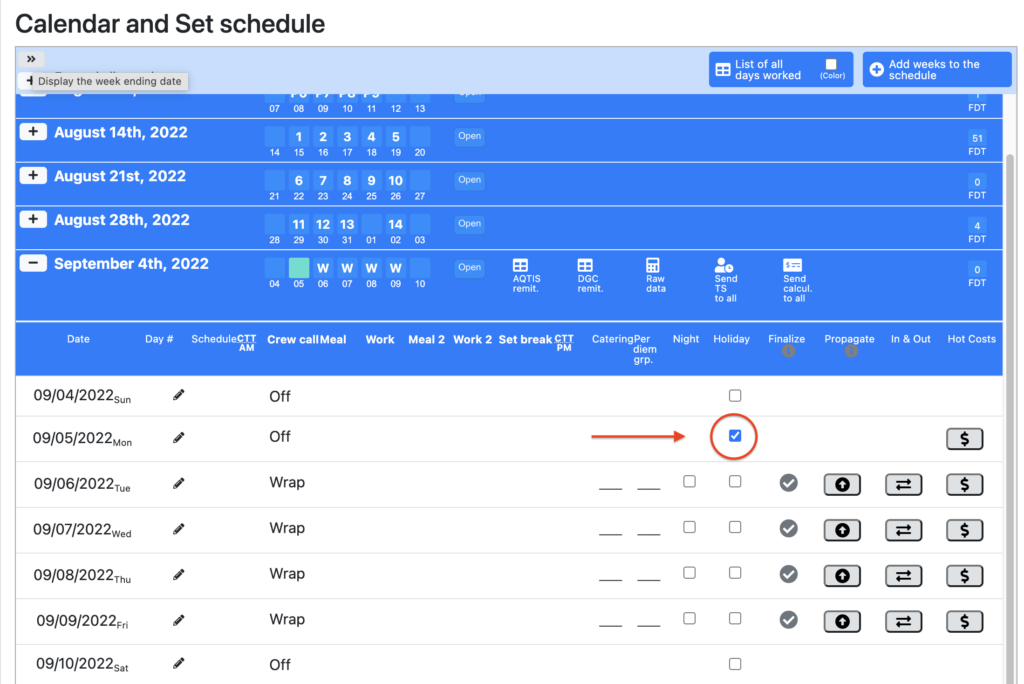
Thereafter, when entering daily or weekly timesheets, be sure to mark the day as completed for each active technician for whom statutory holiday pay is due according to article 12.4 of the agreement.
The orange checkmark in the “Complete” column at the right end of the day must turn green in order for the holiday to be calculated. If the checkmark remains orange, no holiday will be calculated for the technician.

Note that no attendance or time should be entered if the technician did not work on the holiday. The day should simply be completed as indicated above.
***Please make sure to pay attention when the days preceding the holiday are overlapping both the preparation period and the shooting period or if a technician has several contracts. The holiday for each of their contracts must be completed (therefore, checked green) if you wish to activate the calculation of the portion of the indemnities applicable and payable for each contract.
For a summary of all days worked across all contracts, you can also view the “Cumulative Days Worked” report, located at the top of the production schedule. Note that for the calculation, Setpad takes into account the different MGH in the technician’s contract worked during the last 20 days. You can refer to the List of all days worked for details.
Note to accountants: To verify calculated holidays; in the Timesheets tab, position yourself in team entry mode (day) on the date of the holiday to quickly see the technicians who receive or do not receive the holiday (green bracket on the right = calculated holiday) and in the case where the brackets are orange, see if you really want to ignore them.


